
Use Sandfish when you need to explain what a phishing page does after someone interacts with it. It can fill supported forms with test data, record the submission, and link a finding to the request that supports it. You can keep the captured website, review it after the site disappears, and find related captures through shared code and identifiers.
Sandfish starts free. Paid plans start at $50 USD per month, including private submissions. Its value is the combined phishing investigation: follow the page, inspect where data went, and retain the evidence. For historical website searches, multiple security-engine opinions, or running a downloaded program, another tool can be the better choice. The tables below show those differences and their cost.
Last verified: 28th October 2026. Written by Sandfish. Features and prices come from current product documentation and Sandfish's deployed plan catalog. The case observations are from 27th October. We tested Sandfish and the regular urlscan Scan API, and read existing VirusTotal URL reports. Other products were reviewed through vendor documentation.
Features at a glance
“Not documented” means the cited documentation does not establish that feature. It is not a failed test. Paid features are labeled. Automatic interaction means taking actions after page load; supported forms and challenges vary. Scroll horizontally on a narrow screen to compare every column.
| Product | Automatic interaction | Live manual control | Run downloaded programs | Evidence and investigation tools |
|---|---|---|---|---|
| Sandfish | Yes; supported forms with test data | No | No; file capture only | Linked requests and findings; WACZ replay; rescore; kit and identifier search |
| urlscan.io / Pro | Form submission not documented for regular scans | Yes; Pro Live Browsing | No | Screenshots, page source, requests; historical search; visual and structural search in Pro |
| ANY.RUN | Yes; Hunter / Enterprise Suite | Yes | Yes | Process and network reports; screenshots; file and traffic exports |
| VirusTotal URL | Form submission not documented | Not a live-control URL service | Separate file-analysis service | Multi-engine results; URL metadata and relationships; additional context with Premium |
| Cloudflare Radar URL Scanner | Form submission not documented | Not documented | Not documented | Screenshots, network logs, reports; visual and structural search |
| Hybrid Analysis / Falcon Sandbox | Phishing-form coverage not established | Not established in reviewed sources | Yes | Execution reports, detection signatures, and attack-technique mappings |
| Joe Sandbox | Yes; phishing automation | Yes; session limits vary | Yes | Execution reports, network captures, memory dumps; Mail Monitor on paid Cloud plans |
Sandfish's WACZ is a web archive that stores captured responses for later inspection and browser replay. A network log lists exchanges; an execution report describes what a program did on a machine. These outputs answer different questions. Missing responses and browser-state differences can limit replay.
What Sandfish gives you
A Sandfish investigation connects four actions:
- Follow the phishing flow automatically. Supported clicks and form submissions can reveal a password, card, or code stage beyond the landing page. The report shows the actions and why interaction stopped.
- Open the request behind a finding. Inspect its destination, available body, response, and source page. This lets you distinguish a configured form destination from a submission the browser actually made.
- Keep and reassess the evidence. Inspect the saved web archive or apply current rules to stored facts without another live visit. Earlier completed evaluations remain available. Rescoring cannot recover evidence never captured.
- Find related deployments. Search request destinations and identifiers, or inspect kit relationships based on shared implementation. A shared kit shows software reuse; an actor cluster shows selected identifier reuse, not a verified person's identity.
These are ordinary web-analysis, follow-up, and search workflows. Sandfish also accepts saved emails, keeps authentication evidence, and links eligible HTML parts and URLs to web analyses. Its QR analysis reads captured screenshots and can follow eligible destinations. It does not execute email attachments as programs.
The practical benefit is that a reviewer can move from “this looks like phishing” to the page, submission, and destination that explain the finding. The cases below show that benefit and where the capture stopped.
Prices and allowances
All dollar amounts are USD, checked on 28th October 2026. An annual price is an annual commitment, not a monthly subscription. Allowances below use the vendor's units: submissions, scans, file uploads, and API requests are different. “Quote required” means the reviewed source does not publish a fixed paid price.
| Product and price source | Free access | Paid price | What affects the comparison |
|---|---|---|---|
| Sandfish | 10 submissions/day with an account | Starter $50/month: 50/day; Pro $100/month: 150/day; Team $500/month: 1,000/day | API access on all account plans; private submissions on paid plans |
| urlscan.io / Pro | 5,000 public, 1,000 unlisted, and 50 private scans/day | Automate: $5,000/year; Professional: $1,250/month or $12,500/year | Automate is API-only. Professional includes Pro and 10 seats; it is not a single-user equivalent of Sandfish Starter |
| ANY.RUN | Community: public analyses; 60-second sessions; personal license | Hunter and Enterprise Suite: quote required, billed yearly | Hunter adds private analysis and automation. Enterprise Suite lists team features and 1,500+ API tasks/month |
| VirusTotal | Public API: 500 requests/day, at most 4/minute | Premium API: quote required | Free API excludes commercial products/services and business workflows that do not contribute new files |
| Cloudflare Radar | Free / Radar: 5,000 public scans/month; search history limited to the last 50 scans | Higher allowances depend on the Cloudflare plan; no standalone scanner price in this source | Free / Radar has no unlisted scans. Country selection requires Enterprise |
| Hybrid Analysis / Falcon Sandbox | Community service; CrowdStrike's upgrade page lists 30 file uploads/month | Falcon Sandbox: quote required; licenses start at 250 files/month | Commercial Falcon Sandbox adds private analysis and expanded reports; it is a different offer from the community service |
| Joe Sandbox Cloud | Basic: public samples/results; limited API | Pro and Enterprise: quote required | Pro starts with 5 users. The page lists both 10 and 15 Basic analyses/month; confirm the quota |
Sandfish also permits five guest URL or email submissions per public IP per UTC day. Account browser and API submissions share one daily allowance. Starter, Pro, and Team permit 2, 4, and 10 active operations respectively. Despite its name, Team does not create a shared private workspace: private groups remain owner-only. See access and limits and account plans.
For occasional URL checks, urlscan and Radar provide more free scan volume than Sandfish. For automatic phishing-form investigation with owner-only private records, Sandfish has a published $50/month entry price. We cannot rank it against quote-based products on price without their quotes. urlscan Professional also buys team access and historical threat-hunting tools, so its price is not a like-for-like measure of one capture.
Privacy labels also need checking. Cloudflare's Unlisted reports are readable by anyone with the scan ID. urlscan's Unlisted reports are visible to vetted Pro customers; its Private reports can be shared by scan ID. Sandfish private records require their authenticated owner.
Where each alternative is stronger
urlscan.io: historical search and live browsing
Use urlscan Pro when the next task is to find other copies, search historical scans, or monitor saved searches. Its visual and structural searches help find similar pages before you know a shared collector. Pro's Live Browsing also gives an analyst mouse and keyboard control.
Sandfish is a useful next step when you have a URL and want automatic form interaction with findings linked to captured submissions. Our case comparison used urlscan's regular Scan API; it did not test Pro's manual browsing.
ANY.RUN: a live machine and attachment chains
Use ANY.RUN when you need to open a file, intervene in a session, or inspect the processes a program starts. It also automates phishing investigation. Its published demonstration follows an email into a PDF attachment, decodes a QR code, and passes a website challenge. That is a vendor demonstration, not a test we reproduced.
Sandfish's email and screenshot-QR processing does not establish the same PDF attachment coverage. Choose Sandfish for the recorded web flow; choose ANY.RUN when desktop interaction or the attachment-to-program chain is central.
VirusTotal: engine results and related threat information
Use VirusTotal URL reports to check which engines flag a URL and inspect available metadata and relationships. Premium access adds context and licensed API use.
Sandfish adds a browser investigation you can trace through form submissions. An engine count does not identify the request that received a password. The Xfinity example below shows why those two reports can be useful together.
Cloudflare Radar: configurable website scans
Use Radar URL Scanner for a shareable scan, related-page searches, custom headers, or a custom referrer. It provides screenshots and report/network-log downloads. Successful scans have a 12-month retention policy; searchable history still depends on the plan.
Sandfish supplies the automatic test-data interaction and request-linked findings described above. We found no equivalent form-submission feature in the reviewed Radar guide, and we did not run a paired Cloudflare capture.
Hybrid Analysis: behavior after a file runs
Use Hybrid Analysis when the question is what a downloaded program does. CrowdStrike's report documentation describes detection signatures and MITRE ATT&CK mappings, a common vocabulary for attacker behavior. Commercial Falcon Sandbox expands the service.
Sandfish can retain the delivery request, file details, and available bytes. It does not observe the program's operating-system effects. If you use both services, connect their records with a complete-file hash. A truncated capture's hash identifies only the retained fragment.
Joe Sandbox: execution detail and mailbox intake
Use Joe Sandbox Cloud for detailed execution reports, memory dumps, manual machine control, or paid Mail Monitor intake for reported emails. Joe also documents phishing automation and QR processing; automatic interaction is not exclusive to Sandfish.
Sandfish offers a focused web investigation with saved responses, linked findings, and versioned reevaluation. We did not compare the two products' capture coverage. Joe's documented execution and mailbox features are reasons to choose it when the investigation extends beyond the website.
Real cases: what the extra evidence changes
These are selected examples, not a detection benchmark. Both Sandfish and
urlscan flagged all three phishing URLs we tested. Both left example.com,
our basic legitimate control, unflagged as malicious. Existing VirusTotal
reports already flagged all three phishing URLs. The difference was the
evidence available to explain the site, not a demonstrated detection win.
Banco Pichincha: from a credit form to a collection request
We sent the same URL to both services within seconds. The urlscan capture showed a fake Banco Pichincha credit form. The Sandfish capture continued through card and code prompts.
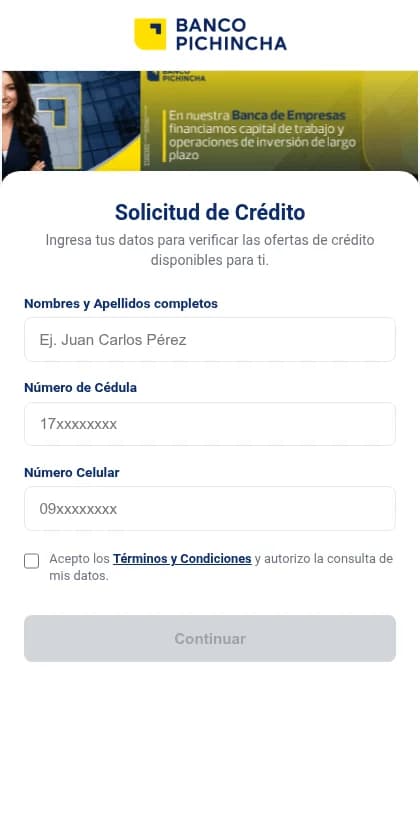
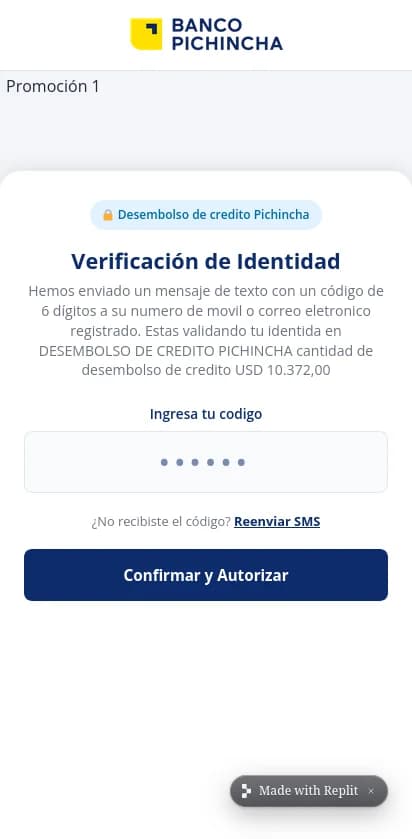
More importantly, Sandfish linked its test-credential finding to a POST to Discord's webhook service. The archived exchange has a request body and an HTTP 204 response. That gives the analyst a collection destination and a recorded submission to inspect, beyond the initial form's appearance.
The Sandfish run stopped at the code stage with partial evidence. It does not prove completed fraud or that an attacker read the data. Sandfish used mobile Firefox; urlscan used desktop Chrome. Browser settings, network location, and site behavior can affect the result. This pair shows the additional evidence in these runs, not that Sandfish always reaches further.
Xfinity: the final page hid the earlier submission
The VirusTotal URL report already had 22 malicious engine results and one suspicious result when we read it. The paired urlscan report also flagged the URL, but its recorded POSTs were challenge requests.
Sandfish recorded a form submission to the Weebly host, with an HTTP 200 response, before the browser opened a real Xfinity page. The useful difference is destination evidence: the sign-in data went to the lookalike site's form endpoint, not to the legitimate site shown afterward. That supports a more precise incident report than the last screenshot or an engine count alone.
The source note retains the exact requests, snapshots, evaluation IDs, and older VirusTotal analysis times. It also includes the less useful Meta result: Sandfish's later login request went to Facebook, so we did not count it as collection by the appeal-page operator.
Choose by the evidence you need
Choose Sandfish for automatic phishing-form investigation, inspectable submission evidence, saved web content, and related-case search. Choose urlscan Pro for historical website hunting, VirusTotal for engine and relationship context, or Radar for configurable website scans. Choose ANY.RUN, Hybrid Analysis, or Joe Sandbox when program execution is part of the question; ANY.RUN and Joe also offer live control and phishing automation.
To assess Sandfish, open the bank-page analysis and follow its finding into the recorded request. Then submit a URL or email to check the workflow on your own case.
Sources and revision
This article replaces the six individual platform comparisons and their overview on 28th October 2026. It adds one feature table, verified prices and allowances, and explicit explanations of what the case differences mean.
The comparison source note contains all four attempted inputs, the control, settings, report IDs, figure sources, and the dated feature and pricing references. We ran no new scans for this revision. The small, Sandfish-positive sample does not measure detection accuracy, speed, or false-positive rates.