
The page says that a OneDrive file is waiting. It shows a nine-character code and a link to microsoft.com/devicelogin. It has no password field. The link opens the real Microsoft sign-in service. The deception is in the code: a separate server supplies it to the page, which presents account authorization as a way to open a document.
Sandfish captured this page on 15th October 2026. The archive contains the server response that delivered the code. Five earlier captures, from 16th September to 7th October, use the same verification API paths and a similar response format. Four also use the same form of numeric-array encoding. The comparison shows how a shared verification backend supports different document and account-verification pages.
A file that needs a Microsoft code
The landing page is a static HTML file in a Linode Object Storage bucket. The host name is ghtmxpfauthideia3consult.us-sea-1.linodeobjects[.]com. The page shows a OneDrive card with a sender, a file named "Secure document.pdf", and a verification code.
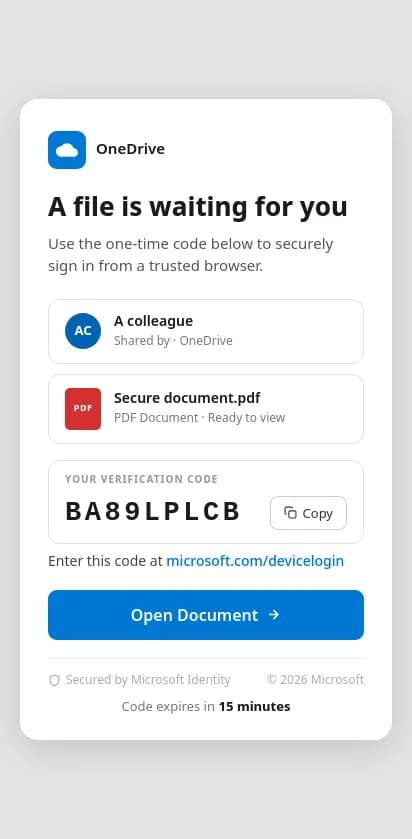
The landing page before interaction, 15th October 2026, 04:06 UTC. The server stated a 15-minute code lifetime.
Microsoft uses this code format for the device authorization grant. A television or a command-line tool that cannot show a browser asks Microsoft for a code. A person then enters the code at microsoft.com/devicelogin on another device and signs in. Microsoft gives the tokens to the program that asked for the code, not to the browser where the person signed in.
This page uses that separation. Its backend supplies a code, and its instructions send the visitor to Microsoft to approve it. In a successful device-code attack, the program that requested the code receives tokens for the account. The capture shows code delivery and navigation to Microsoft. It does not show the backend's request to Microsoft or a successful account authorization.
Where the code comes from
The archived document hides the card and its code in a list of 14,536 integers. A script applies exclusive OR with the key 72 to each integer. It converts the results to characters and writes the decoded HTML with document.write. That HTML contains the card and this configuration excerpt. The backend address is defanged:
var CFG = {
  backendUrl: "https://panel.kboyy[.]world",
  linkId: "lnk_97754e64765846be",
  flow: "relay",
  promptProfile: "default",
  scopeType: "graph",
  verificationUri: "https://microsoft.com/devicelogin",
  // ...
};The script schedules initialization after 400 milliseconds. It generates a session UUID and sends a request to the configured backend:
GET https://panel.kboyy[.]world/api/verification/init?session=<random UUID>&scope_type=graph&flow=relay&prompt_profile=default&link_id=lnk_97754e64765846beThe archived response contains these fields:
{
  "success": true,
  "user_code": "BA89LPLCB",
  "verification_uri": "https://microsoft.com/devicelogin?prompt=login",
  "expires_in": 900,
  "poll_interval": 5,
  "app_type": "prt",
  "flow_mode": "prt",
  "prompt_profile": "prt",
  "message": "Device code generated successfully"
}The page inserts user_code into the card. It also replaces its configured verification address with the server's verification_uri. This is a response-driven interface: the server supplies both the code and the destination.
The Open Document handler first copies the code. It then opens the verification address in another tab. The capture records a request to /api/verification/copy-click on the panel, followed by redirects from microsoft.com/devicelogin to login.microsoftonline.com/common/oauth2/deviceauth. The button opens an authorization page, not a PDF.
The script also schedules a poll of /api/verification/check?session=…. If the server returns token_captured, the page shows a success message and navigates to an exit URL. In this sample, the configured exit is an Outlook attachment deep link. That exit was not reached. The first capture contains no check request; several related captures do, with token_captured: false and a message that authentication is pending.
The server selects the sign-in mode
The request asks for flow=relay, scope_type=graph, and prompt_profile=default. The response labels the result prt in three fields. A related DocuSign-themed capture requests flow=broker but receives the same prt labels. Client configuration alone therefore does not establish which mode the server used.
The label is significant, but it is not proof of a Primary Refresh Token. In its 14th February 2025 update on device-code phishing, Microsoft described an attack using the Microsoft Authentication Broker client ID. The attacker used the resulting refresh token to register a device and obtain a Primary Refresh Token. That is relevant technical context for the panel's labels. These captures expose no client ID, device registration, or issued token. They do not establish a connection to the actor in Microsoft's report.
The client code provides more direct evidence of how the software handles authentication failures. The 7th October document contains these branches after decoding:
| Server field | Client response |
|---|---|
refresh with a new user_code | Replace the displayed code and verification address. Close the old popup and show a retry notice. |
ca_blocked | Stop polling and use the server's redirect or the configured exit. |
mfa_fallback with auth_code_url | Stop polling and navigate to an interactive authorization URL. |
token_captured | Hide the code, show success, close the popup, and navigate to the exit. |
A comment beside refresh says the server rotated to a new client ID after a Conditional Access block or expiry. Another describes mfa_fallback as a response to required MFA registration. The handlers show that the client can accept those server decisions. The reviewed captures do not demonstrate a policy bypass or a successful fallback.
The same script contains an optional password-submission function. It would send an email address and password to /api/verification/credentials before initialization. However, this document has no corresponding password input element. The reviewed flow uses the device code; the unused password branch reveals a shared script with more capabilities than this template exposes.
Six deployments share the verification interface
Searching the captured requests for /api/verification/init returned six analyses on 15th October 2026. Each used a different backend hostname. These are capture dates, not deployment start dates:
| Capture, 2026 | Page identity | Backend host | Requested flow → response label |
|---|---|---|---|
| 16th Sep | Microsoft Teams | vollob[.]bond | first_party → first_party |
| 18th Sep | Microsoft Security | panel.boxdropmesa[.]com | prt → prt |
| 30th Sep | DocuSign | panel.dexterrrr[.]icu | broker → prt |
| 2nd Oct | Microsoft Security | panel.carmalpmc.co[.]zw | prt → prt |
| 7th Oct | Microsoft Security | panel.thinkdifferentfx[.]icu | relay → prt |
| 15th Oct | OneDrive | panel.kboyy[.]world | relay → prt |
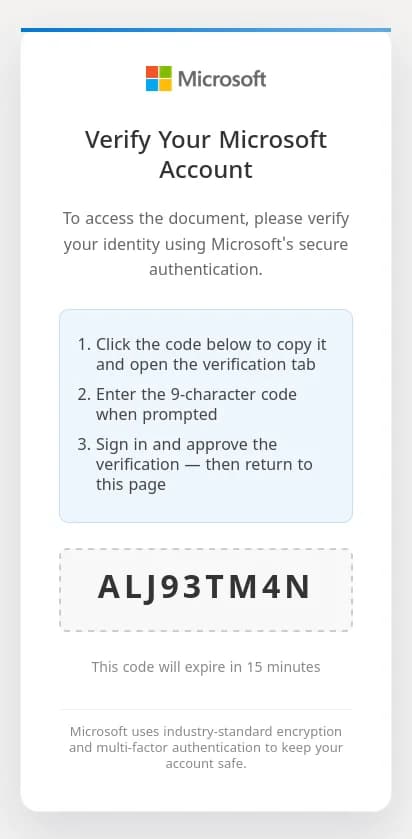
The related account-verification template, 7th October 2026, 03:06 UTC.
Four landing pages use Linode Object Storage. One uses Cloudflare Workers. The remaining capture starts at a short link and reaches an HTML file under another site's /wp-content/ directory. That path alone does not prove that the site was compromised.
The earliest document is readable HTML. The other five use numeric arrays, XOR keys, split property names such as String['fromCh'+'arCode'], and document.write to reconstruct the page. Their keys differ: 142, 186, 229, 54, and 72 in capture-date order. The response fields and verification paths connect the backend interface; the encoding wrapper and shared client handlers connect the implementation. Together, they support a related software family. They do not establish one operator or six customers.
Scanner checks happen before the document appears
The 15th October document contains two copies of a short script before the encoded page. It reads the user agent and compares it with names including Proofpoint, Barracuda, Mimecast, IronPort, urlscan, and several other security products. It also checks navigator.webdriver.
If either condition matches, the script calls window.location.replace with https://microsoft.com. This gives a matching scanner a route away from the lure before normal interaction. The code states that behavior. Sandfish's capture continued to the OneDrive card, so it does not demonstrate the alternate response to a blocked user agent.
The related templates also collect a browser fingerprint through /api/verification/fingerprint. Their source includes screen dimensions, browser capabilities, a local-storage session ID, and, in later versions, the webdriver flag. Their captures record fingerprint submissions. Fingerprint collection and the early redirect are separate behaviors: one sends browser properties to the server; the other controls which page appears.
What changed after the investigation
The original OneDrive analysis scored 15 with an unknown verdict. It identified OneDrive on an unrelated domain and a browser automation check. It missed the device-code flow because the link had no prefilled code parameter and the API paths differed from an existing request pattern.
The correction reads user codes and verification addresses from archived JSON responses. It relates each response to its captured request and navigation, then checks whether the deceptive page displays the same code. A separate correction covers compact code-entry lures and scanner-name checks that change the page. This uses the captured behavior instead of adding a signature for one panel hostname.
After deployment, an archive refresh changed the original case to 100, malicious. The five related captures changed from unknown scores of 8–20 to malicious scores of 75–80. Those totals include the other rules active at refresh time, so they are not a measurement of R020 alone.
A new live capture, started at 12:16 UTC on 15th October, received a different code from the same panel and reached the same Microsoft device-authentication endpoint. It also scored 100. Interaction remained partial, with one action and no submission. No account authorization or token capture was demonstrated.
Indicators and method
| Role | Indicator |
|---|---|
| Landing host, 15th October | ghtmxpfauthideia3consult.us-sea-1.linodeobjects[.]com |
| Landing file | /onedrive-notify-1791849349676.html |
| Observed code supplier | panel.kboyy[.]world, GET /api/verification/init |
| Observed click tracking | Same backend, GET /api/verification/copy-click |
| Configured polling | Same backend, GET /api/verification/check |
| Original document SHA-256 | a23a8984263564b8cf0379f23c3d4d8700118afa7dc347102e6e21e9c4118a9f |
| Legitimate authorization service | microsoft.com/devicelogin, then login.microsoftonline.com/common/oauth2/deviceauth |
| Configured exit | Outlook attachment deep link; not reached |
Research used persisted Sandfish requests, snapshots, screenshots, and archived response bodies. The initial case had 16 requests and seven snapshots. Its paginated evidence endpoints were read to completion. The six-case comparison came from an exact request-path search across the stored corpus on 15th October 2026. The count excludes the later recapture. We decoded the numeric arrays locally and compared the resulting configuration and handlers. We did not inspect an administration panel or authenticate an account.
The principal finding is the relationship between the code supplier and the approval page. A genuine Microsoft destination does not explain who initiated the authorization. Here, the separate panel supplies the code, the lure displays it as document verification, and the client waits for a token-capture result.