
The page looks like DHL Track & Trace. A tracking number is already in the field. When the visitor presses Track, the page asks for the front camera and for the precise location. It then takes one frame from the camera and sends it, with the GPS coordinates and the tracking number, to its own server.
Sandfish captured this page at parcel-tracking.mail-glassdoor[.]com on 14th October 2026. The page asks for no password, card, or address. Its only collection path is the camera and the location.
urlscan.io records show an earlier version two days before, on a different subdomain of the same domain. That version also asked for the camera and the location. But it hid its upload behind a captcha that no visitor could solve. The change between the two versions answers one question: how did the operator make the collection path work?
A Track button that asks for the camera
The landing page copies the DHL header, navigation, and FAQ. It loads the DHL logos from www.dhl.com. The tracking field contains the fixed value JV014789362US. There is no form element. A script on the Track button does all the work.
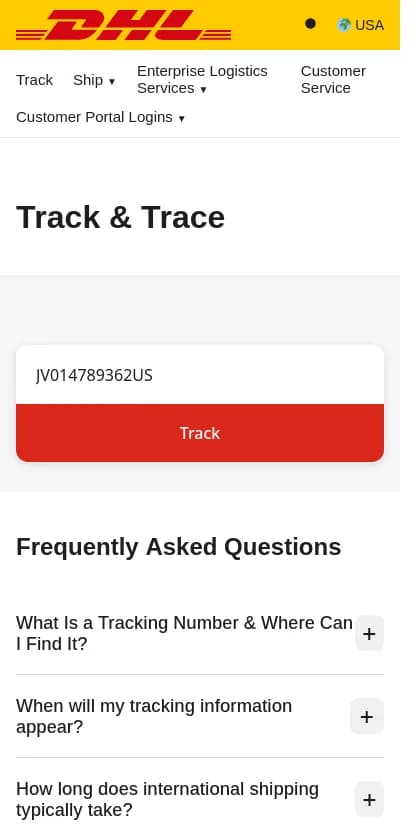
The recaptured landing page before interaction, 14th October 2026, 21:43 UTC.
The archived document contains the full sequence. When the visitor presses Track, the script does these steps:
- It waits 2.3 to 2.7 seconds. A code comment says that this delay "makes permissions feel natural".
- It asks for the location with high accuracy and a 10-second limit.
- At the same time, it asks for the front camera (
facingMode: "user") at up to 1280×720, without audio. - When the video starts, it draws one frame on a hidden canvas. It encodes the frame as a JPEG at quality 0.7.
- If neither permission is given, it shows "Verification failed. Please allow permissions." and stops.
- If one or both permissions are given, it sends the data to
/api/verifyon the same host.
The video and canvas elements are hidden. The visitor sees only a loading state on the Track button. No part of the page shows the camera image.
What the page sends
The upload is one JSON POST with four fields:
| Field | Value |
|---|---|
username | The value of the tracking field |
latitude, longitude | The browser position, or null |
image | The JPEG frame as a data URL, or an empty string |
The field name username is not a DHL term. A code comment calls the tracking number the "username equivalent". The page uses the field only as a label for the upload. Because the field is prefilled, a visitor who does not type anything sends JV014789362US.
After the server accepts the upload, the page shows a fixed DHL popup. It says "Delivered" and gives the address 312 S Dearborn St, Chicago. The address does not change with the tracking number. Five to six seconds later, the browser goes to the real DHL home page.
The script also builds a device profile when the page loads. It contains the user agent, screen size, time zone, languages, platform, and network type. But the script only writes this profile to the browser console. It does not add the profile to the upload. The upload carries the face-camera frame, the coordinates, and the tracking-field value, and nothing more.
The earlier version could not upload
A urlscan.io scan on 12th October 2026 at 14:52 UTC recorded an earlier version. It was on express-parcel-delivery-tracking-service-monitoring-hub.mail-glassdoor[.]com. The page has the same layout, the same prefilled tracking number, and the same /api/verify destination. The collection logic is different.
| Behavior | 12th October version | 14th October version |
|---|---|---|
| Permissions | Camera is mandatory. Location is optional. | Either permission is enough. |
| Frames | Three frames, 800 ms apart | One frame |
| Screen during capture | A "Security Check" captcha | A loading state on the button |
| Upload condition | The captcha answer must match | No condition after the permissions |
| Extra upload field | additional_images with two frames | None |
| Result | Never reached. The page stays at the captcha. | A "Delivered" popup, then the DHL home page |
In the earlier version, the captcha appears while the script takes the three frames. A code comment calls it a "distraction while capturing images". But the upload happens only when the visitor types the correct code. The code generator makes six characters. The input field has maxlength="4". A visitor cannot type or paste six characters into the field, so the answer never matches. The script marks the field red and waits. It never calls the upload function.
Thus, the 12th October page took camera frames in the browser but could not send them. The 14th October page removes the captcha and sends one frame directly. It also accepts the location alone when the visitor refuses the camera. These two changes make the collection path reachable.
The earlier version has other leftover details. A function named generateAzusaAddress has a comment about a PO box in Azusa, California. Its output is a Chicago PO box. The later version replaces it with the fixed Dearborn Street address.
On 13th October at 11:46 UTC, a urlscan.io scan of the earlier subdomain recorded a Cloudflare "Suspected Phishing" interstitial with HTTP 403. The first reviewed scan of the parcel-tracking subdomain followed on 14th October at 13:14 UTC. The scans give observation times. They do not show when the operator changed the deployment, or why.
Comments name an older PayPal page
The 14th October script contains 17 comment lines that mention PayPal. Eleven say "SAME AS OLD PAYPAL". They mark the device profile, the permission requests, the validation, the upload, the redirect map, and the button handler. Six say "Like PayPal" next to button and message styles. The 12th October version has no PayPal comments.
The comments show that the author compared the new logic with an earlier PayPal-themed page. The new logic accepts either permission and uploads one frame. The comments state that this matches the "old PayPal" page. We did not find that page in the Sandfish corpus or in the reviewed urlscan.io results. We cannot confirm what it collected, or who deployed it.
What the captures show
Sandfish pressed the Track button in the recapture. In the next 11 seconds, the page showed no popup and no error message. The browser sent no request to /api/verify. The capture does not show which permission step held the page. No reviewed capture contains an upload request or a server response. The collection behavior in this article comes from the archived scripts, not from an observed upload.
Both subdomains used the same TLS certificate. It was issued by Google Trust Services (WE1) and is valid from 21st August 2026. Both sites were behind Cloudflare. The registrable domain mail-glassdoor[.]com was registered on 8th May 2026. Its RDAP record was last changed on 21st August 2026. These facts connect the two subdomains as one deployment history. They do not identify the operator.
The page does not ask for credentials or payment data. A review that looks only for those fields does not find a collection path. The collection path is in the button handler: a camera request and a location request whose results go to a server. Sandfish now reports the two parts as separate findings. The case shows a camera-capture upload with the DHL impersonation and a separate location upload.
Indicators and method
| Role | Indicator |
|---|---|
| Landing page, 14th October | hxxps://parcel-tracking.mail-glassdoor[.]com/ |
| Landing page, 12th October | hxxps://express-parcel-delivery-tracking-service-monitoring-hub.mail-glassdoor[.]com/ |
| Configured upload destination | POST /api/verify on the same host |
| Landing document, 14th October, 13:14 UTC | SHA-256 c7dc3e49d772bf1f292b60fcb07ddc1267bc8eba741953fc2988aab0d2d82e69 |
| Landing document, 14th October, with the Cloudflare beacon | SHA-256 28f8df3065c34d3a3ec0b8e15820687573e55d74bbbb327a751e179e3ebef8d0 |
| Landing document, 12th October | SHA-256 070629b000bc7b220fa6af687e894d1f7540fc1cc68ce7b0e7f82d2d56902ec1 |
| Prefilled tracking value | JV014789362US |
| Borrowed resources | DHL logos from www.dhl.com |
| Exit | www.dhl.com |
The two 14th October documents differ only by one Cloudflare analytics script tag. DHL and Cloudflare are service providers here. Their domains are not blocking indicators.
Research used two Sandfish captures from 14th October 2026: the first capture at 19:40 UTC and the recapture at 21:43 UTC. It also used four urlscan.io scans: 01a13099-54ef-737a-895c-0006c1c93cf5 (12th October, 14:52 UTC), 01a13515-3edd-7708-9650-0bd5ccb5dc1c (13th October, 11:46 UTC), 01a13a84-4a10-76f2-ab7a-08704051d2cb (14th October, 13:14 UTC), and a second scan on 14th October at 16:48 UTC. We compared the archived landing documents line by line. We searched the Sandfish corpus for the document hashes and the script function names. These searches returned only this deployment.
We did not send the page a camera frame, a position, or a tracking number. We did not call /api/verify. The server-side handling, retention, and use of the data are unknown. We found no evidence of victims, of the delivery channel, or of the operator's identity.